
I recently began publishing full entries in the RSS feed for SimpleBits, figuring that if people would rather read the entire Notebook post in the comfort of their aggregator, they could go ahead and do so. Personally, I enjoy reading content in its intended environment, with all the site design around it, and find myself skimming NetNewsWire for interesting articles to pull up in a browser later on.
Publishing full posts has got me thinking more about what unstyled entries look like when read in an aggregator, and specifically how floated figures are treated (or untreated in this case).
Floating an image that's related to a certain paragraph (and letting text flow around it) is normally done with CSS (we've left the ol' align attribute behind with other presentational artifacts). Take that CSS away, and depending on how you've marked up those floated figures, the display can be awkward -- and usually not quite as intended.
How I float figures on SimpleBits
Currently, I use a combination of classes set right on the <img> element to float the image left or right, with or without a border. So, as far as markup is concerned, the image is set inline within the desired paragraph:
<p><img src="image.jpg" alt="giraffe" />Just the other day, I saw a giraffe crossing the street.</p>
Then by adding a class, or combination of classes, I'll direct that image to float left or right.
<p><img src="image.jpg" alt="giraffe" class="thumb" />Just the other day, I saw a giraffe crossing the street.</p>
The thumb class is the default (a potentially inappropriate class name, but one that's been used on this site for years), and floats the image to the right, adding a small amount of padding as well as a single-pixel border around the image. To override this, I've created two other classes that will alternatively float the image left, and omit the border if desired:
<p><img src="image.jpg" alt="giraffe" class="thumb alt plain" />Just the other day, I saw a giraffe crossing the street.</p>
The alt class floats the image left instead of right, while the plain class removes the default border around the image. Additionally, there's an alone class for images that I don't want to float at all. By mixing these mulitple classes on a figure, I can place them where I'd like throughout the entry.
Awkward Rendering
Getting back to viewing all of this through an aggregator, since <img> is an inline element, it's bottom will sit alongside the first line of text in the paragraph, pushing preceding paragraphs up as far as the image is tall. Not exactly an elegant reading layout (see below).
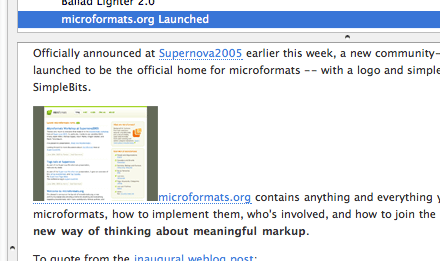
Alternatively, you could markup up figures with a block-level wrapper, such as a <div> (or perhaps more controversial -- a paragraph, as I've just done in the example above), assigning a class to the wrapper instead. This will at least place the image on its own line, separated from the paragraphs of text. Occassionally, I use a definition list to mark up figures that have a caption, floating the entire list to one side. Like any given design requirement, there are appoximately 5,834 ways to meet it. But with most of these ways, without CSS -- it's still not going to present as intended (floated).
With RSS fever sweeping the web, it's brings up some interesting presentation/content questions. I've noticed some feeds (even those that show full posts) choose to strip out images altogether. But those that read only within an aggregator may completely miss the entire picture. Without a "read more" flag (or equivalent), they might assume they've digested the post, 100%. I don't wish to change my meaningful markup choices based on how things might "appear" in certain situations, but it's certainly something that helps in the decision making.
microFigure?
Perhaps a microformat for figures would be helpful -- one that aggregators or custom user stylesheets could tap into in order to align images as they were intended. For instance, if NetNewsWire knew that class="figure" meant: float the image left (or right). This class could be utilized not only on one's proper web site (like I do here at SimpleBits), but also by feed readers and other devices that normally strip style away. A brewing thought.
Ideally, we apply meaning first and foremost to content, and it's interesting how markup choices can absolutely affect design in hidden, invisible ways. The many environments in which content is (and will) be read in the future may end up revealing previously unforseen results more and more.
How much should we care about the appearance of content presented in XML feeds? If we're worried strictly about meaning, then perhaps we should be content with however those elements are displayed in the aggregator (by way of its own default or custom user-defined stylesheet). But with more readers relying on feeds rather than a beautiful CSS-ified site to get their information, it has me thinking.
Oh, and by the way, are you reading this in an aggregator? :-)