
On Wednesday, I had to buy a new battery for my 1.5 year-old PowerBook. Apparently they don't live that long, and I was getting a whopping 10 minutes out of a full charge. PowerBook batteries aren't all that exciting, but I also brought home a Mighty Mouse, which is only slightly more interesting.
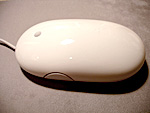 Looking at the Mighty Mouse from the side, it actually looks like an actual mouse, which I'm sure was intentional. The tail, however, is coming out of its mouth, which is perhaps unintentional.
I embarrassingly brought the mouse back to the Apple store the next day, thinking that the little mini scroll ball "nipple" was defective. It didn't "click" when it was depressed, and I figured this particular box slipped by quality control. But it wasn't defective, with the Apple Store Dude explaining that the mouse senses when it's been clicked normally with a finger on the little scroll ball nipple. Ah.
Anyone that's used a two-button mouse with a scroll wheel before, will no doubt agree that's it's far more productive. There's nothing new here, but what is new is how Apple managed to create a mouse that one-button-purists could still use, since it's really just a one-button mouse with touch-sensitive sides. I don't know why I've strayed away from using a third-party multi-button mouse in the past. Perhaps I (and I assume others) have way too much brand loyalty.
I've managed to accidentally click the wrong side many times already. I think having been used to a single, big button has me in the habit of clicking the entire mouse (both left and right sides) with all fingers. So, it'll take some time to get used to clicking each side again.
I'm loving Dashboard so far, so I welcome the ability to click the nipple to activate it. I've found that clicking the nipple and holding it down will enable you to see the Dashboard, then releasing the mouse will hide it again. Alternatively, just quickly clicking will bring Dashboard into view until you click again to hide. The click-and-hold feature is nice if you're just quickly checking the date or weather. Similarly, squeezing the sides to activate Expose has been rather handy as well.
So, all in all, the concepts behind the Mighty Mouse have been around for ages, but as usual, Apple has created something that improves on its usefulness, doesn't get in the way with obvious controls, and is just done well.