
There are situations when using negative margins on an element can be the easiest way to "nudge" it out from the rest, treating the exception to the rule in order to simplifiy code.
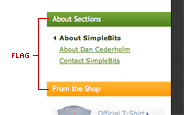 Case in point, I was recently toying with the idea of treating headings in the content area of SimpleBits to match the background "flags" that currently stick out from the right edge of the sidebar (I didn't end up implementing it in the end). These heading flags stick to the right edge of the layout, with padding being declared independently on paragraphs and lists that sit under each heading so that those elements don't butt up against the right edge.
 For the content column however, I already have a gutter declared on the entire column, giving 25px of padding on either side. I want to maintain this spacing, with
 <h3> elements being the only exception. For <h3>s, I'd like the background color to stick to the left edge of the layout, with the heading text lining up with the rest of the content -- 25px in from the left.
I could take the same approach I took with the sidebar, getting rid of the default gutter and instead adding a "catch all" declaration for the left margin on predictable elements (but not headings). Hypothetically:
#content p, #content ul, #content dl {

  margin-left: 25px;

  }
But this approach requires pre-determining the block elements that could be placed in the content column, and adding them to this declaration each time. It works fine in the sidebar, where the content there is predictable, but the content area can contain a multitude of block-level elements at any time.
 So, better yet, I could treat
 <h3> elements as the exception and apply a negative left margin to nudge it out of the gutter that's set for the column. Then they'll sit flush with the left edge of the layout.
#content h3 {

  margin-left: -25px;

  padding-left: 25px;

  background: #cee48b;

  }
A positive left padding value of 25px is added to make sure the heading's text lines up with the rest of the content in the column.
Sometimes it's easier to deal with the exception to the rule, rather than add declarations for all other elements around it. With the latter, it's necessary to prepare for every possible scenario. There are times (like the one I was experimenting with) when a negative value can help simplify things.
Related: See also "Easy CSS drop shadows" from Dunstan Orchard, where negative margins are used to apply a drop shadow effect to photos. This technique was also extended and published at A List Apart.