
Earlier this month I asked for advice regarding phones that can send and receieve email. Only two people in the comments mentioned the BlackBerry Pearl, but that's what I ended up purchasing and have had it now for about 24 hours. What follows is a mini review of the device, this coming from someone who is new to the BlackBerry, new to the mobile web, and new to sending and receiving email using tiny keys. The short version: loving it so far.
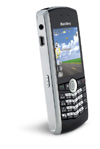 There's several reasons I ended going with the Pearl, rather than the other great suggestions (like the Palm Treo, or Nokia e62, for example).
- I realized I needed to stay with T-Mobile as a provider. I have a pretty great, grandfather'd plan that was too good to give up going somewhere else. Isn't a shame that devices and providers are so locked together?
- T-Mobile's unlimited web and email BlackBerry plans are cheaper than their normal internet plans. You don't get access to HotSpots, but I figure as long as there's carrier service, that won't be difficult to miss.
- The Pearl is _tiny_ for a phone that packs a decent screen and 1.3 MP camera. I knew if it was bulky, I wouldn't enjoy using it as often. It had to fit in a pocket.
- I'm left-handed, so the normal-sized BlackBerry's would've probably been awkward to navigate with the scroll wheel on the right side. The Pearl's trackball works great, and it's in the middle for either thumb.
- My mobile phone is my business phone, so the call quality has to be good. It's been fine so far -- in fact audio coming in has been clearer and louder than previous phones I've owned. I'm not sure how I sound on the other end. I'll have to call myself (wow, what should I say?!).
It took me a bit to get used to how Push email works. I have my main IMAP account set up and assumed I'd see everything in my inbox. Instead, it'll push emails to the BlackBerry, where they'll be until you delete them. You have the option of the delete also removing them from your mail account. But there's a cool feature that lets you "Delete Prior" messages from your inbox. It'll make them disappear from your BlackBerry but not your main IMAP account. Handy if you want a clean slate, and want to only see new incoming messages when you're away from your desk.
As far as the keyboard on the Pearl goes, well that's the tradeoff for the tiny, candybar form factor. It has what BlackBerry calls a "SureType" keyboard setup. There's two letters per key, but they're set up in a QWERTY formation. It really works quite a bit better than I thought it would. If you ignore what's happening on screen while you type, it'll get the right word nearly every time based on the letter combinations. I'm impressed. It's not like typing on a normal keyboard, of course. But short replies will be no problem -- something I'd never attempt on a normal phone keypad.
Finally having a decent web-enabled phone to really play with has been eye-opening. Seeing what sites have a @media="handheld"@ stylesheet, or which sites sniff and serve a mobile-friendly version of their site automatically. From my limited time playing with it, it's clear that there's so many different methods for handling mobile content. One thing's for sure, lean, unstyled markup sure is helpful, even when there's not specifically a mobile version of the same site. We really need Cameron's book.
So all in all, I'm quite pleased with the Pearl. It'll take some getting used to, but it's certainly a helpful improvement. And will hopefully help me work less, stay away longer, etc.
During my tenure at a failed dot com in early 2000, in between margarita parties, all the VPs where saying "the mobile web is going to change the world!". This was 6 years ago. Everyone believed them of course, and dumped millions into mobile products that weren't ready for primetime. But now (and I'm admitedly late to the game) it really feels like there's momentum here -- real stuff happening, "affordable" access, etc. Interesting times.